
Smart homes sound amazing, right? All your devices working together. But sometimes, all that tech can feel like it’s costing you more.
Not just in money, but in energy too. It’s frustrating when you expect savings and get higher bills instead. You want your smart home to be smart about energy use.
We get it. This guide will show you simple ways to make your connected house a power saver.
Smart home efficiency means making your connected devices use less energy. This saves you money on bills and helps the planet. We’ll cover easy tips to optimize your devices and reduce waste.
Understanding Smart Home Energy Use
Your smart home uses energy in a few ways. First, devices need power to run. Think of your smart lights, thermostat, speakers, and hubs.
They all draw electricity. Second, these devices are often always on. They listen for commands or stay connected to your Wi-Fi.
This standby power adds up. Even small amounts of power used constantly can become a lot. It’s like a leaky faucet.
A little drip seems small. But over time, it wastes gallons of water.
Many smart devices use a small amount of power when they are “off.” This is called phantom load or vampire drain. It’s the energy used for features like instant-on capability or background updates. Your smart TV might use power to show a clock.
Your smart speaker might use power to listen for its wake word. These small amounts are easy to miss. But they are a hidden energy cost.
Making your smart home efficient means tackling these hidden costs. It’s about making technology work for your budget and the environment. It makes your smart home truly smart.
Smart Device Power Draw Factors
Device Type: Some devices use more power than others. A smart thermostat uses less than a smart TV.
Usage Habits: How often you use a device matters. A light you leave on all day uses more than one used for an hour.
Standby Power: Many devices use power even when “off.” This is for quick activation or updates.
Network Connection: Staying connected to Wi-Fi uses energy.
The goal is to reduce this constant draw. We want devices to work when needed. But not waste power when they are not.
It’s a balance. You still want the convenience. But you also want the savings.
We will explore how to find this sweet spot. We will look at simple adjustments. These can make a big difference over time.
They help your smart home be kind to your wallet.
Optimizing Your Smart Thermostat
Your smart thermostat is a big player in home energy use. It controls your heating and cooling. This is usually the largest energy consumer in a home.
A smart thermostat can learn your habits. It can adjust the temperature when you are away. This is a great way to save energy.
But there are other settings to consider. You can set it to eco-modes. These modes prioritize energy saving.
They might let the temperature drift a few degrees.
Many people set their thermostat and forget it. This is a missed opportunity. Your smart thermostat can do more.
You can create custom schedules. These schedules match your daily routine. For example, lower the heat when you sleep.
Raise it a bit before you wake up. Turn it down when you leave for work. Come back to a comfortable temperature.
This avoids heating or cooling an empty house.
Consider seasonal adjustments. In summer, set it a bit higher when you are out. In winter, set it a bit lower.
Even a degree or two can save a lot of energy. Some smart thermostats have “away” modes. You can trigger these with your phone.
Or they might sense when no one is home. Make sure these features are turned on and working. Check the settings regularly.
Your needs might change. Your schedule might change. Your thermostat settings should too.
This keeps your home efficient.
Smart Thermostat Quick Wins
- Set smart schedules for when you’re home and away.
- Use eco-modes for extra savings when possible.
- Adjust temperatures by 1-3 degrees for seasons.
- Enable “away” or presence detection features.
I remember a friend who was baffled by high AC bills. Her smart thermostat was installed. She thought that was enough.
But she had never really tweaked the settings. She just used the default program. We sat down together one evening.
We looked at her daily routine. We adjusted the schedule. We set it to a few degrees higher when she was at her office.
We made sure it cooled down just before she arrived home. Within a month, she saw a noticeable drop in her bill. It was a simple change.
But it made a big impact. It showed me how much power you have with these devices.
Another tip is to use smart vents. These work with your thermostat. They can close off vents in rooms you don’t use.
This directs heated or cooled air where you need it most. It’s like closing doors in unused rooms. But it’s more precise.
This prevents energy waste in empty spaces. Ensure your system is balanced. An HVAC professional can help.
They can check if your system works well with smart vents. Proper setup ensures maximum efficiency.
Smart Lighting Strategies for Savings
Smart lights are fantastic. You can control them from your phone. You can set colors and brightness.
But they can also increase your energy use. If left on all the time, they are costly. The key is to use their smart features wisely.
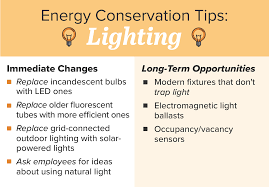
First, make sure you are using LED bulbs. Most smart bulbs are LED. LEDs use much less energy than old incandescent bulbs.
They also last much longer. This is a foundational step for any lighting efficiency.
Next, set schedules for your lights. Schedule them to turn off when you leave rooms. Schedule them to turn off at night.
You can have them dim automatically after a certain hour. This saves energy and can also help with sleep. Many smart lighting systems allow for motion detection.
You can set lights to turn on only when someone enters a room. And turn off when the room is empty for a set time. This is incredibly effective.
Especially in hallways or bathrooms.
Lighting Efficiency Breakdown
Bulb Type: Always choose LED smart bulbs.
Scheduling: Set lights to turn off automatically at specific times or when rooms are empty.
Dimming: Use dimming features to reduce brightness and energy use when full light isn’t needed.
Zoning: Group lights into zones. Control them together for efficiency.
I experienced this myself. I had smart bulbs in my living room. I often forgot to turn them off when I went to bed.
One night, I set a schedule. Lights would dim to 20% at 10 PM. Then turn off completely at midnight.
It was amazing. I wasn’t lying in bed thinking about lights. The system handled it.
My electricity bill showed a small decrease the next month. It was a simple automation. But it removed a recurring source of wasted energy.
It felt good knowing the house was taking care of itself.
Another strategy is to use scenes. Create a “movie night” scene. This dims lights to a comfortable level.
Create a “away” scene. This turns off all unnecessary lights. You can also link lights to other smart devices.
For example, have lights turn off when your smart TV turns on. Or dim when your smart speaker starts playing music. Explore the capabilities of your lighting system.
The more automation you set up, the less you have to remember. And the more energy you save.
Remember to check your device’s power consumption. Some smart bulbs might have a slightly higher standby draw than others. It’s usually minimal.
But if you have hundreds of smart bulbs, it could add up. Look for bulbs with low standby power ratings. Many manufacturers list this.
It’s a detail that often gets overlooked. But it’s part of true smart home efficiency. Always favor devices designed with energy saving in mind.
Smart Plugs and Power Management
Smart plugs are unsung heroes of energy efficiency. They are simple devices. You plug them into an outlet.
Then you plug your appliance into the smart plug. This lets you control that appliance remotely. You can turn it on or off.
You can also set schedules. This is perfect for devices that don’t have built-in smarts. Think of lamps, fans, coffee makers, or even holiday lights.
The biggest win here is tackling phantom load. Many older or non-smart appliances draw power even when off. Your TV might be off, but its clock or standby light is still on.
Your gaming console might be in sleep mode. Your printer might be ready to go. A smart plug allows you to completely cut power to these devices.
You can set a schedule for the smart plug. For instance, turn off power to the entertainment center overnight. Or cut power to the printer on weekends.
This eliminates vampire drain entirely for those devices.
Smart Plug Applications
- Turn off vampire loads: Eliminate phantom power from TVs, game consoles, printers.
- Schedule appliances: Automate when things like fans or coffee makers turn on/off.
- Remote control: Turn devices on or off from anywhere.
- Monitor energy use: Some smart plugs track power consumption of plugged-in devices.
I once had a power strip full of devices for my home office. Computer, monitor, printer, speakers, router. They all used a little power constantly.
I
Some smart plugs go a step further. They offer energy monitoring. You can see exactly how much power a device is using.
This is invaluable for identifying energy hogs. You might be surprised by what consumes the most power. You can then decide if you need to
When using smart plugs, be mindful of device types. Do not use them for critical medical equipment. Or for devices that need to maintain settings.
For example, a smart plug might reset a digital thermostat’s learned schedule. Always check the appliance’s manual. Ensure it’s safe to use with a smart plug.
For most common electronics, though, they are a fantastic tool for efficiency.
Smart Home Hubs and Network Efficiency
Your smart home hub is the brain of your operation. It connects and controls your various smart devices. While hubs are essential, they also consume power.
They are typically always on, listening for commands and managing devices. The efficiency of your hub and your home network impacts overall energy use.
Choose a hub that is known for efficiency. Look at reviews and specifications. Some hubs are designed to be low-power.
Others might have more features but draw more energy. Newer hubs often have better power management. Consider if you need all the features of a powerful hub.
If you only have a few devices, a simpler hub might be more efficient.
Hub & Network Efficiency Factors
Hub Power Consumption: Newer, smaller hubs often use less power.
Network Devices: Routers and modems also use energy. Ensure they are efficient models.
Device Protocols: Zigbee and Z-Wave devices can be more energy efficient than Wi-Fi devices as they use less power.
Firmware Updates: Keep hubs and devices updated. Updates can include power optimizations.
Your Wi-Fi router and modem also play a role. These devices are also always on. Look for energy-efficient models.
Some routers have power-saving modes. They can reduce power consumption during periods of low network activity. Like overnight.
Ensure your router is not unnecessarily powerful for your needs. A high-end router might be overkill for a small apartment.
Consider the communication protocols your devices use. Wi-Fi devices often use more power than devices using Zigbee or Z-Wave. These low-power mesh network protocols are designed for smart home devices.
They allow devices to communicate with each other and the hub using less energy. If you are building a new smart home, prioritize devices using these protocols when possible. It’s a small detail, but it contributes to overall efficiency.
Regularly update the firmware on your hub and devices. Manufacturers often release updates. These updates can include bug fixes and performance improvements.
Sometimes, they also include power-saving optimizations. It’s like giving your devices a tune-up. Make sure your smart home system is running as efficiently as possible.
Smart Appliances and Energy Monitoring
Many modern appliances are now “smart.” Refrigerators, washing machines, dryers, ovens. They connect to your Wi-Fi. They offer remote control and features.
When choosing new appliances, look for energy efficiency ratings. The ENERGY STAR label is a good indicator. Smart appliances can often offer more ways to save energy.
Smart refrigerators might adjust cooling based on door openings. Or alert you if a door is left ajar. Some can optimize their defrost cycles.
Smart dishwashers might have eco-modes. They can also schedule cycles for off-peak hours. This can save money if your utility company offers time-of-use rates.
Smart washing machines and dryers can use sensors. They can detect the load size. They then adjust water and energy use accordingly.
They can also alert you when a cycle is finished. So you don’t leave wet clothes sitting.
Smart Appliance Efficiency Features
Energy Star Rating: Always look for this certification.
Eco-Modes: Utilize special cycles for lower energy consumption.
Load Sensing: Appliances that adjust to load size use less energy.
Remote Monitoring: Get alerts and track usage from your phone.
Scheduling: Run appliances during off-peak hours if available.
The real power of smart appliances comes with energy monitoring. Many smart appliances can track their own energy usage. You can see this data in their companion apps.
This helps you understand which appliance uses the most energy. And when it uses it. This information is key to making informed decisions.
You might learn that your dryer uses a lot of power. You can then focus on using it more efficiently. Or running it only for full loads.
I had a smart washing machine installed. It had a detailed energy report. I was surprised to see how much energy it used on a hot water cycle.
I usually used hot for everything. Seeing the data, I switched to warm or cold water for most loads. It didn’t just save energy.
It also helped my clothes last longer. The smart appliance gave me the data. I used that data to make a more efficient choice.
It was a clear example of technology helping me be smarter about my energy use. This is what smart home efficiency is all about.
When considering smart appliances, compare their energy efficiency ratings. A smart feature is great. But it shouldn’t come at the cost of high energy consumption.
Look for models that balance smart technology with energy saving. Many manufacturers are now focusing on this balance. They understand consumers want both convenience and efficiency.
Creating Energy-Saving Routines
Smart homes thrive on routines. These are automated sequences of actions. They can significantly boost your home’s efficiency.
Think about your daily life. What are the recurring patterns? Morning rush, leaving for work, returning home, bedtime.
You can automate tasks for each of these periods.
A “good morning” routine could slowly raise your smart blinds. Turn on a specific light to a low setting. Adjust the thermostat to your preferred daytime temperature.
Your “leaving home” routine could be even more impactful. It can turn off all lights. Set the thermostat to an energy-saving temperature.
Ensure all smart plugs are in their “off” state. This single routine ensures multiple devices work together for efficiency.
Sample Energy-Saving Routines
Morning Wake-Up: Gradually increase lights, adjust thermostat, open blinds.
Leaving Home: Turn off all lights, set thermostat to away mode, power down non-essential devices via smart plugs.
Evening Wind-Down: Dim lights, adjust thermostat for sleep, ensure all unnecessary devices are off.
Bedtime: Final check for lights, set thermostat to sleep mode, activate security features.
Creating a “good night” routine is also crucial. This can dim lights. Turn off any remaining lights in unused rooms.
Set the thermostat to its nighttime setting. Ensure that smart plugs controlling entertainment systems are powered down. This routine helps you conserve energy while you sleep.
It also ensures peace of mind knowing everything is powered down appropriately.
The beauty of routines is that they happen automatically. You don’t have to remember each step. This is where true smart home efficiency shines.
It’s not just about individual device control. It’s about devices working together. Your smart home ecosystem creates a more efficient environment.
This requires some initial setup. But the long-term energy savings and convenience are well worth it.
I set up a “weekend morning” routine. On Saturdays and Sundays, my blinds open a bit later. The thermostat adjusts more gradually.
Lights come on at a softer brightness. It’s a small difference. But it makes the mornings feel more relaxed.
And it uses a little less energy during those slower hours. It shows how routines can be tailored to your lifestyle. While still keeping efficiency in mind.
When is Smart Home Efficiency a Concern?
Most of the time, smart home devices are designed to be relatively low-power. Especially compared to older, less efficient appliances. The main concern is often the sheer number of devices.
And their constant connectivity. If you have dozens of smart devices all running simultaneously, their collective energy use can be significant.
Another concern is how devices are configured. Default settings are not always the most energy-efficient. Forgetting to set schedules.
Or not utilizing eco-modes. This can lead to wasted energy. It’s easy to assume “smart” equals “efficient.” But it needs a little guidance from you.
Your smart home is a tool. You need to know how to use it effectively.
Potential Efficiency Concerns
Device Overload: Too many devices constantly active.
Misconfiguration: Default settings not optimized for energy saving.
Phantom Loads: Devices drawing power when not in use.
Unnecessary Features: Leaving features on that consume extra power.
Network Strain: Inefficient network setup can lead to devices using more power.
What should you look out for? If your electricity bills suddenly spike after installing new smart devices. Or if your energy consumption reports show unusually high usage from specific devices.
That’s a sign to investigate. Regularly check your smart home app dashboards. Many platforms provide energy usage summaries.
This is your first line of defense. It helps you spot problems early.
It’s also important to consider device lifecycles. Older smart devices might not have the same efficiency standards as newer ones. If a device is several years old, its power consumption might be higher than you realize.
Consider upgrading older devices. Especially if they are high-usage items. This can be an investment.
But it often pays for itself in energy savings over time.
In summary, while smart homes offer great potential for efficiency, it requires active management. Understand what your devices are doing. Set them up for success.
And monitor their performance. This proactive approach ensures your smart home is truly a money saver.
Quick Fixes and Smart Tips
Here are some easy ways to boost your smart home’s energy efficiency:
- Check your Wi-Fi router: Ensure it’s energy efficient. Turn off its indicator lights if they use power.
- Unplug unused hubs: If you switch hubs or have an old one, unplug it.
- Review device settings: Go through your smart device apps. Look for energy-saving options.
- Use voice commands for efficiency: Say “turn off all lights” or “set thermostat to away.”
- Bundle smart plugs: Use multi-outlet smart plugs for areas with many devices.
- Disable unnecessary notifications: Some devices use power to send constant alerts.
- Regularly reboot devices: Sometimes a simple reboot can help devices run more efficiently.
Frequently Asked Questions
Do smart devices use more electricity than regular devices?
Not necessarily. Many smart devices use less energy than their older counterparts. However, they are often designed to be always on, which can increase standby power draw.
The key is to use their smart features to manage this energy use.
How much money can I save with smart home efficiency tips?
Savings vary greatly. It depends on your home size, device usage, and the tips you implement. Some users report saving 10-20% on their energy bills.
Others see smaller but still significant savings. Every bit helps!
Is it worth upgrading to smart appliances for energy savings?
It can be. Smart appliances often have better energy efficiency ratings. They also offer features like energy monitoring and scheduling.
If you are replacing old appliances, smart, energy-efficient models are a great choice. Look for ENERGY STAR certification.
What is phantom load or vampire drain?
Phantom load is the electricity a device uses when it’s turned off but still plugged in. It’s for things like standby modes, clocks, or ready lights. Smart plugs are excellent tools for eliminating this wasted energy.
Should I use Wi-Fi or Zigbee/Z-Wave for my smart home devices?
Zigbee and Z-Wave devices generally use less power than Wi-Fi devices. They create their own mesh networks. This is more energy efficient for many smart home applications.
Wi-Fi is often better for devices needing higher bandwidth, like cameras.
How can I check the energy usage of my smart devices?
Many smart devices and hubs have built-in energy monitoring features in their apps. You can also use smart plugs that monitor energy usage. For a whole-home view, consider a smart energy monitor.
Making Your Smart Home Truly Smart
Your smart home is a powerful tool. It can bring convenience and comfort. But with a few smart adjustments, it can also be a champion of energy efficiency.
By understanding how your devices use power, optimizing settings, and creating smart routines, you can significantly lower your energy bills. You also contribute to a greener planet. It’s about making technology work for you.
And for the environment. Start with one tip today. You’ll be surprised at the difference it makes.
Leave a Reply