
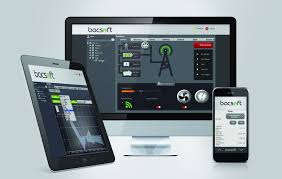
Remote energy management tools let you monitor and control your home or business’s energy use from a distance, often through an app or website. This helps save money by identifying waste and optimizing usage, and it increases convenience and environmental awareness.
Understanding Remote Energy Management
Remote energy management is all about using technology. It lets you keep an eye on your electricity, gas, or water use. You can do this without being there.
Think of it like a smart thermostat. It lets you adjust your home’s temperature from your phone. Remote energy tools do this for all your energy needs.
These systems often use sensors and smart devices. They collect data about how much energy you use. This data is sent to a central hub.
You can then access this info online or via an app. You can see energy usage patterns. You can also find out which devices use the most power.
Some tools let you turn devices on or off remotely.
The main goal is to be more efficient. By understanding your energy use, you can make changes. This leads to lower bills.
It also helps reduce your carbon footprint. It’s a win-win for your wallet and the environment.
My Own Energy Glitch and the Smart Solution
I remember one summer evening. I was at my friend’s house across town. It was late, and I suddenly remembered I’d left my small office lights on.
Not a big deal, I thought. But then I started thinking about all the little things. The fan in the spare room.
The computer charger plugged in, not charging anything. It added up in my head. I felt a pang of worry about the wasted energy and money.
That’s when it hit me. I had recently installed a few smart plugs. They were mostly for convenience, like turning on a lamp from the couch.
But I realized they had an app. A quick check on my phone showed the office lights. With a tap, I turned them off.
Relief washed over me. It was such a small thing, but it showed me the power of remote control. It wasn’t just about turning things on or off.
It was about having peace of mind and control, even when I wasn’t home.
Key Features of Remote Energy Management Tools
These tools come with many helpful features. They are designed to give you control. They also help you understand your energy use better.
Here are some of the common ones you’ll find:
Real-Time Usage Monitoring
See how much energy you are using right now. This helps you spot energy drains as they happen.
Historical Data & Reports
Look back at your energy use over days, weeks, or months. Charts and graphs make it easy to see trends.
Device Control
Turn appliances and lights on or off remotely. This is great for forgotten devices.
Alerts & Notifications
Get warnings about high energy use or unusual activity. This helps you act fast.
Scheduling & Automation
Set devices to turn on or off at specific times. You can also create rules for them to follow.
Cost Tracking
Estimate your energy costs based on usage. This makes savings more real.
Types of Remote Energy Management Systems
There are a few main ways to manage energy remotely. Each has its own strengths. The best choice depends on what you need and your budget.
Smart Plugs and Outlets
These are simple devices. You plug them into a wall socket. Then, you plug your appliance into the smart plug.
You can control the plug using an app. Many also track the energy use of the device plugged into them. They are a great starting point for many people.
Smart Thermostats
These devices control your heating and cooling. You can adjust the temperature from anywhere. Many learn your habits and adjust automatically.
They can significantly reduce energy use for HVAC systems. These systems are often the biggest energy users in a home.
Whole-Home Energy Monitors
These systems connect to your home’s main electrical panel. They provide a complete overview of your entire home’s energy use. They can often break down usage by circuit.
This gives you the most detailed information about where your energy is going.
Smart Home Hubs and Platforms
These act as a central controller for many smart devices. If you have smart lights, smart plugs, and a smart thermostat, a hub can bring them all together. You can then manage everything from one app.
This offers a more integrated approach to energy management.
Commercial Building Management Systems
For larger buildings, these systems are more complex. They manage HVAC, lighting, and other systems. They often integrate with building security and access control.
These are designed for industrial and large commercial settings to optimize energy use across many areas.
The Benefits of Going Remote with Energy
Switching to remote energy management brings many good things. It’s not just about technology. It’s about making your life easier and your home smarter.
Let’s break down why this is a smart move.
Cost Savings
This is a big one for most people. By spotting and stopping energy waste, you pay less. Turning off lights you forgot about saves money.
Optimizing heating and cooling cuts big bills. Over time, these savings add up. Many users report significant reductions in their monthly expenses.
Increased Convenience
Imagine adjusting your thermostat before you get home. Or turning off a hallway light from your bed. Remote control makes daily tasks simpler.
You don’t have to get up or be in the room. This is especially helpful for busy families or people with mobility issues. It adds a layer of comfort to your routine.
Environmental Impact
Using less energy means a smaller carbon footprint. When you use electricity, it often comes from burning fossil fuels. By reducing your demand, you help lower greenhouse gas emissions.
It’s a simple way to contribute to a healthier planet. Many people feel good knowing they are making a difference.
Enhanced Safety and Security
Some systems offer features that improve safety. For example, you can remotely check if appliances are off. This can prevent fire hazards.
You can also use smart lighting to make it look like someone is home when you’re away. This deters potential intruders. It adds peace of mind.
Better Home Comfort
Smart thermostats help maintain a consistent, comfortable temperature. You can pre-heat or pre-cool your home. This ensures it’s just right when you walk in.
No more shivering in winter or sweating in summer. You can set schedules that match your life.
Real-World Scenarios Where Tools Shine
Let’s look at some everyday situations. These show how remote energy tools can really help. They are not just for tech enthusiasts.
They are for anyone wanting to save money and be more efficient.
The Forgetful Family
Imagine parents rushing out the door. They’re late for school drop-off. Lights are left on in bedrooms.
The TV is still running in the living room. The smart plugs and smart home app let them quickly check and turn off all these devices from their phone. No more driving back home or worrying all day.
The energy savings alone can be substantial over time.
The Vacation Home Owner
Owning a second home can be costly. You pay for energy even when no one is there. A smart thermostat lets you set it to an energy-saving mode.
You can then raise the temperature just before you arrive. This saves a lot of money on heating or cooling an empty house. Whole-home monitors can also alert you to potential issues like leaks causing water pump to run constantly.
The Small Business Owner
Small businesses also have energy costs. Lights left on overnight. Computers running when not in use.
A smart plug connected to a coffee maker or a display screen can be turned off remotely. This reduces idle power consumption. It helps keep operating costs down.
A business owner can even monitor usage remotely from home or while traveling.
The Energy-Conscious Renter
Even if you rent, you can benefit. Smart plugs are portable. You can use them to monitor and control individual appliances.
You don’t need to make permanent changes to the home’s wiring. This allows renters to take control of their energy bills without landlord permission. It’s a practical solution for many.
Seasonal Energy Peaks
During hot summers or cold winters, energy use spikes. Smart thermostats can help manage this peak demand. By adjusting temperature settings during critical hours, you can avoid higher “peak” electricity rates that utilities sometimes charge.
This helps smooth out your bills across the year. It’s a proactive approach to energy costs.
What This Means for Your Home Energy Habits
The availability of these tools changes how we think about energy. It moves us from passive users to active managers. It’s empowering to have this kind of control.
It also encourages better habits.
Increased Awareness
Seeing your energy use in real time makes you more aware. You start to notice which devices use a lot of power. You might be surprised by some findings.
For example, an old refrigerator might use much more than you thought. This awareness is the first step to making changes.
Behavioral Changes
Once you know where the energy is going, you tend to change your behavior. You might make an effort to turn off lights more. You might unplug chargers when they are not in use.
You might use appliances more strategically. These small shifts in habit can lead to big savings.
Proactive Maintenance
Some energy monitors can help with maintenance. If a device starts using way more energy than usual, it might signal a problem. A struggling appliance might be failing.
Identifying these issues early can prevent a complete breakdown. It can also save you from unexpected high bills due to a faulty device.
Setting Realistic Expectations
It’s important to know that these tools aren’t magic. They help you manage energy better. But they won’t eliminate your bills entirely.
The savings depend on how you use them and your home’s efficiency. They are tools to help you make informed decisions and optimize your use.
When Is It Normal and When to Worry
With any new technology, people wonder if things are working right. Understanding normal energy use is key. It helps you spot problems.
Normal Usage Peaks
Your energy use will naturally go up and down. It’s highest when you use lots of high-power items at once. Think using the oven, washing machine, and dryer all at the same time.
Or running the air conditioning on a very hot day. These peaks are normal and expected. Your energy monitor will show these spikes.
Unusual Spikes or Drains
What should make you pause? A sudden, unexplained jump in energy use. This might happen overnight when you’re not using anything.
Or a device that suddenly uses double the power it normally does. This could mean a device is faulty. It could also mean something is running that shouldn’t be.
Constant High Usage
If your “base load” – the energy used when everything is off – is too high, that’s a concern. This could be from older appliances that are always drawing power. Or it might be phantom loads from devices in standby mode.
Your tool should help you identify this baseline usage.
When to Check Your Utility Bill
If your smart tool shows you’ve drastically cut usage, but your bill is still high, investigate. There could be an issue with your utility meter. Or perhaps your usage patterns haven’t changed as much as you thought.
Comparing the tool’s data to your actual bill is important.
Quick Tips for Getting Started
Starting with remote energy management doesn’t have to be hard. Here are some simple steps to get you going.
Start Small with Smart Plugs
Buy a few smart plugs. Use them on common devices like lamps, fans, or entertainment systems. See how you like controlling them from your phone.
Track their energy use.
Upgrade Your Thermostat
If you don’t have a smart thermostat, consider one. It’s one of the biggest energy users in a home. The savings can pay for the device fairly quickly.
Understand Your App
Take time to learn your smart device’s app. Explore all its features. Set up alerts.
Create schedules. The more you use the app, the more benefits you’ll find.
Look for Energy Star
When buying new appliances or electronics, choose Energy Star certified models. They are designed to use less energy. This works hand-in-hand with remote management tools.
Check for Utility Rebates
Many utility companies offer rebates for smart thermostats and other energy-saving devices. Check with your local provider to see what discounts you might get.
Frequently Asked Questions
What is the most basic remote energy management tool?
The most basic and often the easiest to start with is a smart plug. You plug it into the wall, then plug your appliance into it. You can then control the plug and monitor its energy use from an app on your phone.
Do I need a special internet connection for these tools?
Yes, most remote energy management tools require a stable Wi-Fi connection. The devices connect to your home’s Wi-Fi network. This allows them to send data to the cloud and receive commands from your app.
Your router needs to be functioning well.
Are these tools difficult to set up?
For most consumer-level tools like smart plugs and thermostats, setup is usually straightforward. They often come with clear instructions. You typically just need to download an app, connect the device to your Wi-Fi, and follow the prompts.
Some whole-home monitors might require more technical skill or professional installation.
Can I use these tools if I rent my home?
Absolutely. Smart plugs are ideal for renters as they are portable and require no permanent installation. Smart thermostats can sometimes be swapped out with the original thermostat, provided you keep the original to reinstall when you move.
Always check with your landlord if making any changes.
How much money can I really save with energy management tools?
Savings vary greatly. It depends on your current energy habits, the types of devices you manage, and your local energy rates. However, many users report saving 10% to 20% or even more on their energy bills by reducing waste and optimizing usage with these tools.
Consistent use is key.
Are there any security risks with smart energy devices?
Like any connected device, there are potential security risks. It’s important to use strong, unique passwords for your Wi-Fi network and your device accounts. Keep your device firmware updated.
Stick to reputable brands known for good security practices. Most major brands take security seriously.
Conclusion
Remote energy management tools are a game-changer. They put power and insight right into your hands. You can save money.
You can make your home more comfortable. And you can help the environment. Start exploring these options.
You might be surprised at how much control you can gain. It’s a smart step for a smarter home.

Leave a Reply