
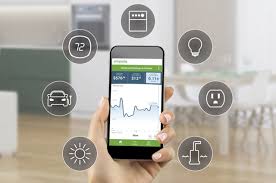
What is a Home Energy Monitoring System?
A home energy monitoring system is a tool. It helps you track how much electricity your home uses. It also shows where that energy is going.
Think of it like a smart meter for your whole house. Or even for specific appliances. These systems can be simple or very advanced.
They often connect to your electrical panel. Some systems use sensors. Others plug into outlets.
They gather data about your energy use. This data is then sent to an app or website. You can see your energy use in real time.
You can also see historical data. This helps you understand your habits. It points out where you might be wasting power.
Many systems focus on the main power coming into your home. Others let you monitor individual circuits. Some even track specific devices.
The goal is always the same: clarity. You get a clear picture of your energy consumption. This is key to making smart changes.
The technology behind these systems is quite clever. It uses sensors to measure electrical current and voltage. From that, it calculates power (watts) and energy (kilowatt-hours).
This information is then processed and displayed in an easy-to-understand format. Most systems use Wi-Fi to send this data.
Why Do Home Energy Monitoring Systems Matter?
Energy costs keep going up. Many of us feel this pinch. We want to lower our bills.
A monitoring system shows you exactly what costs you money. It highlights energy hogs. You might be surprised by what you find.
For example, a device left on standby might use more power than you think. An old refrigerator could be a big drain. Or maybe your heating and cooling system runs more than it needs to.
The system will show you this. It puts the numbers right in front of you.
Beyond saving money, these systems help the environment. Using less electricity means less strain on power grids. It can also mean less reliance on fossil fuels.
This is good for everyone. It helps reduce your carbon footprint. Many people feel good about doing their part.
These systems also empower homeowners. You are no longer in the dark about your energy use. You have the data.
You can make informed decisions. You can change your habits. You can upgrade inefficient appliances.
You can even add solar power more smartly.
The information provided is incredibly detailed. It’s not just a monthly bill. It’s a breakdown of your usage.
This allows for targeted improvements. You can see the impact of changes you make right away. This feedback loop is very motivating.
How Do Home Energy Monitoring Systems Work?
At its core, an energy monitoring system measures electricity flow. It uses sensors placed at key points in your electrical system. The most common type of sensor uses a method called “current clamping.”
A clamp sensor wraps around a wire. It detects the magnetic field produced by the electricity flowing through that wire. This magnetic field strength tells the system how much power is moving.
The system then calculates the energy used over time. Energy is usually measured in kilowatt-hours (kWh).
Some systems have a main sensor. This sensor attaches to the main power line coming into your house. This gives you an overall view of your home’s total energy use.
Other systems have smaller sensors. You can attach these to individual circuit breaker wires. This lets you see exactly how much power each part of your home uses.
This detailed data is then sent to a central hub or directly to the internet. This hub is usually a small box. It connects to your home Wi-Fi.
From there, the data is uploaded to a cloud server. You can then access this information on a smartphone app or a computer website.
The app or website shows you the data in charts and graphs. You can see usage by hour, day, week, or month. Some systems even break down usage by appliance category.
This makes it easy to spot trends. It helps you understand your consumption patterns.
The display is usually very visual. You might see a live reading of your current power usage. You can also see historical data.
This helps you compare your usage over different periods. It shows you how much you spent on energy. It can even predict future bills.
Understanding Key Terms
Watts (W): This is the unit of power. It’s like the speed of electricity flow. A high-wattage device uses a lot of power at once.
Kilowatts (kW): 1000 watts equal 1 kilowatt. This is a more common measure for larger power loads.
Kilowatt-hour (kWh): This is the unit of energy. It’s power used over time. It’s what your electric company charges you for.
Real-time monitoring: Seeing your energy use as it happens.
Historical data: Looking at past energy use to find patterns.
Types of Home Energy Monitoring Systems
There are several types of systems available. Each has its own pros and cons. Choosing the right one depends on your needs and budget.
Whole-Home Systems: These are the most comprehensive. They usually install in your electrical panel. They connect to your main power lines.
They track all the electricity coming into your house. These systems give you a complete picture. They are great for understanding overall usage.
They often require professional installation. Some popular brands include Sense, Emporia Vue, and Span.
Smart Plugs with Monitoring: These are simpler and cheaper. You plug them into a wall outlet. Then, you plug your appliance into the smart plug.
The plug monitors the energy used by that specific appliance. You can monitor a few key devices this way. They are easy to set up.
They are good for targeting specific problem items. Examples include Kasa Smart plugs and Wemo Insight.
Circuit-Level Monitoring: These systems install in your electrical panel. They have multiple sensors. Each sensor clips onto a wire for a specific circuit breaker.
This lets you see the energy use of individual circuits. You can track your HVAC, kitchen appliances, or entertainment system separately. Emporia Vue is a good example of this type.
Utility-Provided Smart Meters: Many electric companies are now installing smart meters. These meters transmit your usage data to the utility. Some utilities offer portals or apps.
These let you view your data. The data might not be as detailed as dedicated systems. But it’s a free starting point.
Check with your local power company.
DIY and Open-Source Options: For tech-savvy users, there are open-source solutions. These often involve microcontrollers like Arduino or Raspberry Pi. You can build your own sensors and software.
This offers maximum customization. But it requires technical skills.
Each type offers a different level of insight. Whole-home systems give the big picture. Circuit-level systems offer more detail.
Smart plugs are great for specific devices. Utility meters provide basic data. Consider what you want to achieve.
Key Features to Look For
When you’re looking at systems, keep these features in mind. They can make a big difference in how useful the system is.
Real-time Data: This is crucial. You want to see what’s happening right now. This helps you catch energy spikes.
It helps you see the immediate effect of turning something off.
App/Web Interface: A good app is essential. It should be easy to navigate. It should show data clearly.
Look for charts and graphs. It should let you set alerts. A user-friendly interface makes a system more valuable.
Device/Appliance Recognition: Some advanced systems can identify specific appliances. They learn what your devices sound like. They know when they turn on and off.
This is very helpful. It tells you which appliance is using power.
Alerts and Notifications: You should be able to set alerts. For example, get a notification if energy use goes above a certain level. Or if a device is left on too long.
This helps you manage your energy use proactively.
Historical Data and Reporting: The system should store your past usage. You need to see how you’ve done over time. Good reporting tools can highlight savings.
They can show trends clearly.
Installation: Is it DIY friendly? Or does it need a professional electrician? Whole-home systems often need an electrician.
Smart plugs are plug-and-play.
Integration: Does it work with other smart home devices? Like smart thermostats or voice assistants? This can add more convenience.
Cost: Systems range from $20 for a smart plug to several hundred dollars for a whole-home system. Factor in installation costs too.
Think about how you want to use the system. Do you want to track your whole house? Or just a few problem devices?
Your answer will guide you to the right features.
Quick Scan: Top Features for Beginners
Easy Setup: Plug-and-play is best.
Clear App: Shows usage simply.
Real-time Readings: See what’s on now.
Basic Reports: View daily and weekly use.
My Experience with an Energy Monitor
I remember when I first got my home energy monitor. It was a whole-home system. I was excited but also a little nervous.
The electrician came and installed the main sensor in my panel. It took him maybe an hour. Then, I set up the app on my phone.
The moment I opened it, I saw a number. It was my home’s current power usage.
I stood there, watching it. It changed as I walked around. Lights being on or off made a difference.
Turning on the microwave caused a big jump. It felt like magic, but it was just science. I started watching it more closely over the next few days.
What struck me first was the “phantom load.” This is the energy used by devices when they are turned off but still plugged in. My TV, my game console, my computer – they were all drawing power. I never knew how much it added up to.
The monitor showed me a steady hum of energy use, even late at night when everyone was asleep.
I decided to test it. I unplugged all the devices in my living room. The number on the app dropped significantly.
It was a “wow” moment. I then made a habit of turning off power strips. I bought a few smart plugs to control other items.
The change was noticeable on my next bill.
It was also fascinating to see my HVAC system at work. I could see the big spike when the AC kicked on. I learned how long it ran.
This helped me understand my thermostat settings better. I realized that small adjustments could save energy. It wasn’t about living in the dark.
It was about being smart with power.
This system gave me the power of knowledge. It made energy saving tangible. It wasn’t just an abstract concept anymore.
I could see the results of my actions. That was the best part. It made the effort feel worthwhile and very real.
Real-World Context and Scenarios
Where and how you use energy matters. A home in Arizona will use energy differently than one in Alaska.
Climate: In hot climates, air conditioning is a major energy user. A monitoring system can show you exactly how much AC is costing you. You can see if your thermostat settings are efficient.
You can track how long your AC runs each day. In cold climates, heating is the big one. You can monitor electric heaters or heat pumps.
You can see the impact of insulation.
Home Size and Age: Larger homes generally use more energy. Older homes might have less efficient insulation or older appliances. A monitoring system can highlight these areas.
It can show if an old furnace is a major energy drain. It can track the usage of multiple rooms.
Occupants and Habits: How many people live in the home? What are their habits? A family with kids might use more energy for electronics and lights.
People who work from home might use computers and other devices more often. A monitoring system can show the energy impact of these daily routines. It helps identify usage spikes during peak hours.
Appliance Efficiency: Newer appliances are often much more energy-efficient. Older ones can be power hungry. A monitoring system can help you pinpoint these older, inefficient appliances.
You can then decide if it’s worth upgrading. For example, an old refrigerator might use a lot more power than a new ENERGY STAR model.
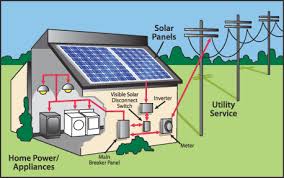
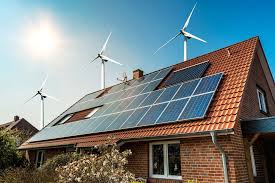
Renewable Energy Sources: If you have solar panels, an energy monitor can be invaluable. It can show you how much energy your panels are producing. It can also show you how much energy you’re using from the grid.
This helps you understand your home’s energy balance. You can see how much you are self-consuming.
The context of your home environment is key. Understanding these factors helps you use the monitoring system best. It allows you to tailor your energy-saving efforts.
Scenario Spotlight: The Phantom Load Problem
Situation: You’re in bed, the house is quiet, but your electric bill is still high.
Cause: Many electronics draw power even when “off.” This is phantom load or vampire power.
Examples: TVs, computers, game consoles, chargers, microwaves with clocks.
Monitoring Solution: A whole-home or circuit monitor shows this consistent background usage. Smart plugs can help you easily cut power to these devices when not in use.
What This Means for You: When is it Normal?
It’s important to know what’s normal for your home. Energy monitoring helps you find that baseline.
Normal Usage: Seeing your lights on when you’re home is normal. Your refrigerator running to keep food cold is normal. Your HVAC system kicking on to maintain a comfortable temperature is normal.
The key is understanding the patterns.
Usage Spikes: You’ll see spikes when you turn on high-power devices. This includes ovens, microwaves, hair dryers, or electric kettles. These are usually brief and expected.
Consistent Background Use: There will always be a baseline usage. This comes from your refrigerator, Wi-Fi router, and any devices on standby. A healthy baseline might be around 100-200 watts for a typical home when most things are off.
When to Worry: Unexplained spikes are a red flag. If your energy use suddenly jumps without a clear reason, investigate. A circuit that feels hot to the touch is also a concern.
Strange smells from outlets or the electrical panel require immediate attention.
Sudden Increases: If your bills suddenly go up without a change in habits, something is wrong. Your monitoring system should show you this change. It might be an appliance failing.
It could be a wiring issue.
Simple Checks: Walk through your home when you expect low usage. Check your monitor. Is the number higher than you expect?
Then, start unplugging devices one by one. See which one makes the number drop. This helps you find the hidden energy drains.
Understanding normal is the first step. Then you can spot the abnormal. This knowledge is power.
It helps you keep your home safe and efficient.
Normal vs. Concerning: Quick Check
Normal:
- Lights on when you’re in a room.
- Appliances like refrigerators and freezers running.
- Heating or cooling systems cycling on and off.
- Temporary high usage when using an oven or dryer.
Concerning:
- Sudden, unexplained high energy usage.
- Lights flickering or dimming without cause.
- Outlets or switches feeling unusually warm.
- Burning smells from electrical devices or the panel.
- A consistently high “off” mode usage.
Quick Fixes and Tips for Saving Energy
Once you have your data, you can make changes. Here are some simple tips. They can help you use less energy right away.
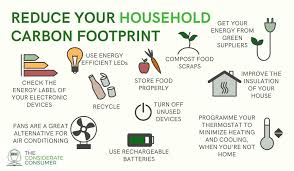
Unplug or Use Smart Plugs: For devices that aren’t used often, unplug them. Or use smart plugs. You can then turn them off easily with an app.
This tackles phantom load.
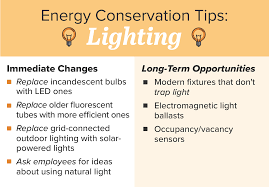
Switch to LED Lights: If you still have old incandescent bulbs, switch to LEDs. They use much less energy. They also last longer.
This is a simple upgrade with big savings.
Adjust Your Thermostat: Small changes to your thermostat can save a lot. Lower it a few degrees in winter. Raise it a few degrees in summer.
Use a programmable or smart thermostat. It can do this automatically.
Seal Air Leaks: Check for drafts around windows and doors. Use weatherstripping and caulk. This keeps heated or cooled air inside.
It means your HVAC system doesn’t have to work as hard.
Use Appliances Wisely: Run your dishwasher and washing machine only when full. Use the cold water setting for laundry when possible. Air dry clothes instead of using the dryer.
Use the microwave or toaster oven instead of the big oven for small meals.
Maintain Your HVAC System: Change air filters regularly. Get your system checked by a professional each year. A well-maintained system runs more efficiently.
Use Fans: Ceiling fans or portable fans can help you feel cooler. This allows you to raise your thermostat setting in summer. They use much less energy than AC.
Monitor and Adapt: Use your energy monitor to see what works. Did turning off devices at night help? Did adjusting your thermostat make a difference?
The data will show you.
These tips are easy to implement. They don’t require major renovations. They help you make the most of the energy you do use.
Saving energy is good for your wallet and the planet.
Energy Saving Quick Wins
- Target Phantom Load: Unplug unused devices or use smart plugs.
- Light Up Smart: Swap old bulbs for energy-saving LEDs.
- Thermostat Tactics: Adjust temps by a few degrees.
- Seal the Drafts: Block air leaks around windows and doors.
- Laundry Smarts: Wash full loads and use cold water.
Frequent Questions About Home Energy Monitoring Systems
Are home energy monitoring systems worth the cost?
For most people, yes. While there’s an upfront cost, the savings on your electricity bills can often pay for the system over time. Plus, they help you understand your home better.
This knowledge can lead to bigger savings and more efficient living.
Do I need an electrician to install an energy monitor?
It depends on the type. Simple smart plugs are plug-and-play and require no electrician. Whole-home systems and circuit-level monitors usually connect to your electrical panel.
These often require installation by a qualified electrician to ensure safety and proper function.
Can these systems track solar panel energy production?
Many advanced home energy monitoring systems can track solar production. They integrate with your solar inverter data. This allows you to see your home’s total energy picture.
You can see what you produce and what you consume from the grid.
How accurate are home energy monitoring systems?
Most reputable systems are very accurate. They use precise sensors to measure electrical flow. For whole-home systems, accuracy is typically within 1-2%.
For individual smart plugs, it’s also quite good. Accuracy is important for making informed decisions.
Can I see my energy usage on my phone?
Yes, almost all modern home energy monitoring systems come with a smartphone app. This app is where you’ll view your real-time data, historical reports, and set alerts. It’s the primary way you interact with the system.
What is the biggest energy user in a typical home?
In most homes, the biggest energy users are heating and cooling systems (HVAC). After that, water heaters, refrigerators, clothes dryers, and ovens are usually the next biggest consumers. An energy monitor will help you see which of these are the biggest drain in your specific home.
How often should I check my energy usage?
You can check as often as you like! Many people check daily to see trends. Some like to review weekly or monthly reports.
Checking regularly helps you stay aware and make adjustments quickly. The real-time data lets you see immediate impact.
Conclusion
Home energy monitoring systems are powerful tools. They offer insight into your home’s energy use. This clarity helps you save money.
It also helps you reduce your environmental impact. By understanding your consumption, you can make smarter choices. Start with simple steps.
See what your system tells you. You’ll be amazed at how much you can learn and save.


Leave a Reply