
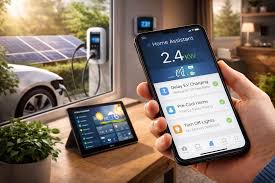
Automating energy saving routines means using smart technology and consistent habits to reduce household energy use without constant manual effort. This involves smart thermostats, lighting controls, and mindful appliance use, leading to lower utility bills and a smaller environmental impact.
What is Automating Energy Saving?
Automating energy saving is all about making your home use less power without you having to be there to flip every switch. It uses smart devices and thoughtful planning. The goal is to make your home’s energy use happen automatically.
This saves you money and helps the earth.
Think of it like setting your alarm clock for the morning. You don’t wake up and decide when to get out of bed each day. You set it once, and it helps you wake up.
Automating energy saving is similar but for your home’s power use. It’s about setting up systems that work for you, even when you’re busy or not at home.
This approach tackles energy waste in several areas. It looks at how you heat and cool your home. It considers how lights are used.
It even thinks about what your appliances do when you’re not looking. By automating these things, you gain control over your energy bills.
My Own Energy Saving Oops Moment
I remember one summer. It was incredibly hot here in Texas. I was away for a long weekend visiting family.
Before I left, I thought, “I’ll save energy by turning the AC way up.” I set it to 85 degrees, thinking that was smart. I felt so proud of myself for being so thrifty!
When I got back on Sunday night, the house was like an oven. The air felt thick and muggy. My electricity bill for that month was shocking.
It was way higher than usual, even though I had been gone! I couldn’t figure out why. It turned out the AC had to work incredibly hard to cool the house down from that high temperature.
It ran non-stop for hours.
That taught me a valuable lesson. Just thinking you’re saving energy by turning things off or setting them super high isn’t always the right answer. Sometimes, a more consistent, smarter approach is needed.
It’s not just about turning things off. It’s about using energy wisely, even when you’re not around to watch it. This is where automating energy saving routines truly shines.
Smart Thermostat: Your Home’s Brain
A smart thermostat learns your schedule. It knows when you are home and when you are away. It adjusts the temperature automatically.
This means you aren’t heating or cooling an empty house. You can also control it from your phone. This is a big step in automating your home’s energy use.
How Smart Thermostats Work Their Magic
Smart thermostats are like the control center for your home’s climate. They connect to your Wi-Fi. This lets them do many things that older thermostats can’t.
First, they learn your patterns. If you always leave at 7 AM and get back at 6 PM, it learns this. It will then lower the heat or AC when you leave.
It will start warming or cooling the house just before you arrive. This saves energy because the system doesn’t run when no one is home to feel it.
Second, you can set schedules yourself. You can tell it when to be warmer or cooler. This is great for nights or when you’re home sick.
You can set a cooler temperature for sleeping. You can set it warmer for when you wake up. These settings are saved and followed automatically.
Third, many smart thermostats can connect to weather forecasts. If it’s going to be a cooler day, it might adjust its cooling schedule. If a heatwave is coming, it can prepare your home.
This helps your system run more efficiently.
Finally, you can control them from anywhere with a smartphone app. This is super handy. If you’re on vacation and remember you left the AC on too high, you can change it right from your phone.
This is key to automating energy saving routines. It gives you peace of mind and actual savings.
Quick Scan: Smart Thermostat Benefits
| Benefit | How It Helps Save Energy |
| Learning Schedules | Avoids heating/cooling empty spaces. |
| Remote Control | Lets you adjust from anywhere, preventing waste. |
| Energy Reports | Shows where energy is used, helping you optimize. |
Smart Lighting: Bright Ideas for Savings
Lights are a big part of energy use in any home. We often forget to turn them off. This wastes power.
Smart lighting can fix this easily. It makes lights work for you, automatically.
One common type is smart bulbs. You can screw them into existing lamps or fixtures. These bulbs connect to your Wi-Fi.
You can then control them with an app or voice commands. This means you can turn them on or off from your phone. It also means you can set schedules for them.
Imagine lights turning on just as it gets dark outside. Then, imagine them turning off when you go to bed. Or, lights in rooms you aren’t using can automatically shut off after a set time.
This is a huge part of automating energy saving routines.
Another option is smart switches or dimmer controls. These replace your regular wall switches. They offer the same benefits of scheduling and remote control.
They can also dim lights, which uses less energy than full brightness. Dimming also creates a nice mood!
Motion sensors are also a great addition. They detect if someone is in a room. If no one is detected for a while, the lights can turn off automatically.
This is perfect for hallways, bathrooms, or closets. You never have to worry about leaving lights on by accident again.
Contrast: Old Lights vs. Smart Lights
Traditional Lights
- Must be turned on/off by hand.
- Often left on when not needed.
- No scheduling or remote control.
- No dimming features for energy saving.
Smart Lights
- Can be scheduled to turn on/off.
- Can be controlled remotely via app.
- Motion sensors turn them off automatically.
- Dimmable for mood and energy saving.
Appliances: The Silent Energy Users
Appliances in your home use power all the time. Some use a lot, even when they aren’t actively running. This is called “phantom load” or “vampire power.” It happens with TVs, computers, game consoles, and even chargers.
Smart plugs can help manage this.
A smart plug is a small device. You plug it into a regular outlet. Then, you plug your appliance into the smart plug.
These plugs connect to your Wi-Fi. They allow you to control the power going to the appliance. You can turn them on or off with an app or a schedule.
This is perfect for devices that don’t need to be on 24/7. You can set a smart plug to turn off your entertainment center at midnight. Or, you can schedule your coffee maker to turn on at 6 AM and turn off at 7 AM.
This stops phantom load from wasting energy when the appliance isn’t in use.
Some smart plugs also track energy usage. This is really useful. You can see which devices are using the most power.
You can then make informed decisions about how to manage them. This data helps you get better at automating energy saving routines. It’s about making smarter choices based on real numbers.
Beyond smart plugs, look at your actual appliances. Newer appliances are much more energy-efficient. When it’s time to replace an old fridge or washer, choose ENERGY STAR certified models.
They are designed to use less power and water. This is a long-term investment in saving energy and money.
Stacked Micro-Sections: Smart Plug Uses
Home Office Power Down: Schedule printers, monitors, and charging stations to turn off overnight. Stop phantom load from draining power.
Entertainment Center Control: Turn off gaming consoles, sound systems, and smart TVs completely when not in use. Save energy and prevent accidental power-ons.
Kitchen Gadget Management: Schedule decorative lights or slow cookers to turn off after a certain time. Avoid unnecessary energy use.
Water Heating: A Big Energy Hog
Heating water uses a lot of electricity or gas. It’s one of the biggest energy expenses in most homes. Automating savings here means being smarter about when and how you use hot water.
Many water heaters have settings. You can adjust the temperature. Setting it lower, around 120°F (49°C), is often enough.
Higher temperatures waste energy and can be dangerous. Check your water heater’s manual for instructions. This is a simple, manual step that leads to automated savings.
If you have an electric water heater, consider a smart timer. You can connect this timer to your water heater. It lets you set a schedule.
For example, you might only need hot water during waking hours and evenings. The timer can heat water during those times and then shut off or lower the temperature overnight. This saves a lot of energy.
It means the water isn’t being kept super hot when no one is using it.
For tankless water heaters, automation is built-in. They only heat water when you need it. This is very efficient.
However, they can still use some standby power. Ensure they are set to their most efficient setting.
Insulating your water heater tank and pipes is also a great idea. This is a one-time fix that provides ongoing savings. It keeps the water hotter for longer.
This means the heater doesn’t have to work as hard to reheat it. This is another way to support your automating energy saving routines.
Observational Flow: Water Heater Savings
Step 1: Check Temperature. Ensure your water heater is set to 120°F (49°C). Lower is better for savings and safety.
Step 2: Insulate. Add an insulating blanket to older tanks and foam sleeves to hot water pipes. This keeps heat in.
Step 3: Install Timer (Electric Heaters). Set a timer to heat water only during peak use times. Save energy overnight.
Step 4: Consider Upgrades. If your heater is old, look into ENERGY STAR models or tankless options for long-term efficiency.
Automating HVAC: Beyond the Smart Thermostat
While smart thermostats are great, HVAC (heating, ventilation, and air conditioning) systems can be automated further. This involves looking at the whole system, not just the control panel.
Programmable vents or zone control systems are one way. These systems allow you to control the temperature in different rooms or zones of your house. If you’re not using a guest room, you can have it set to a lower temperature.
This saves energy by not heating or cooling unused spaces. These systems can be programmed through a central control panel or app.
Regular maintenance is also key. An HVAC system that is well-maintained runs more efficiently. Dirty air filters restrict airflow.
This makes the system work harder and use more energy. Many smart home systems can remind you when it’s time to change your air filter. This is a simple form of automation that has a big impact.
Ceiling fans can also be automated. Some smart ceiling fans can be programmed. They can turn on when the room temperature reaches a certain point.
They can also turn off when the room cools down. Ceiling fans use much less energy than air conditioners. Using them smartly can reduce your reliance on AC.
This is a great addition to automating energy saving routines.
Consider smart blinds or curtains. These can automatically open and close based on the sun’s position or the indoor temperature. In the summer, they can close to block out heat.
In the winter, they can open to let in sunlight and warm the house. This works with your HVAC system to keep the house at a comfortable temperature naturally.
Card Grid: Smart HVAC Add-ons
Programmable Vents
Control temperature by room. Save energy on unused areas.
Smart Air Filters
Get reminders to change filters. Keep your system running efficiently.
Smart Ceiling Fans
Automate fan use based on room temperature. Reduce AC load.
Smart Blinds/Curtains
Block sun in summer, let it in during winter. Natural climate control.
Outdoor Energy Saving Automation
Energy saving isn’t just about what happens inside your walls. Your yard and outdoor spaces can also benefit from smart energy management.
Smart sprinklers are a great example. These systems connect to weather forecasts. They don’t water your lawn if it’s rained recently.
They also adjust watering schedules based on the season and temperature. This prevents overwatering and saves a significant amount of water. Water use often means energy use, especially if you have a well pump.
Outdoor lighting can also be automated. Use solar-powered lights. They charge during the day and turn on at dusk.
You can also use smart outdoor plugs for string lights or landscape lighting. Schedule them to turn on and off at specific times. This avoids lights being on all night when they aren’t needed.
It enhances security and ambiance with less energy waste.
Consider smart garage door openers. If your garage is attached to your home and you often leave the door open longer than needed, a smart opener can help. You can get alerts if it’s left open.
You can also program it to close after a certain time. This prevents conditioned air from escaping your home, especially during extreme temperatures.
These outdoor strategies contribute to overall energy efficiency. They are often overlooked but are a key part of comprehensive automating energy saving routines. They make your whole property more sustainable.
Split Insight Panel: Smart Sprinkler Savings
Label: Water Conservation
Note: Smart sprinklers use local weather data and soil moisture sensors to water only when needed. This can reduce water usage by up to 30% or more. Less water wasted means less energy used by pumps and fewer resources consumed overall.
Putting It All Together: Creating Your Routine
So, how do you actually create these automating energy saving routines? It’s not as complicated as it might sound. Start with one area and build from there.
1. Assess Your Needs: Walk through your home. Where do you think energy is being wasted?
Is it heating and cooling? Lights left on? Appliances running when they shouldn’t?
Understanding your biggest energy uses is the first step.
2. Start Small: Don’t try to automate everything at once. Pick one or two things to begin with.
A smart thermostat or a few smart plugs are great starting points. They offer significant savings and are relatively easy to set up.
3. Choose Compatible Devices: Look for devices that work together. Many smart home systems are built around hubs or platforms like Google Home, Amazon Alexa, or Apple HomeKit.
Choosing devices within the same ecosystem can make them easier to control and automate.
4. Set Up Schedules: Once you have your smart devices, take the time to set up schedules. Think about your daily and weekly routines.
When are you typically home? When are you asleep? Program your devices accordingly.
5. Use Geofencing: Many smart devices use geofencing. This means they know when you leave or arrive home based on your phone’s location.
You can set your thermostat to an energy-saving mode when you leave and have it start warming or cooling when you’re on your way back. This is a powerful way to automate.
6. Monitor and Adjust: Energy saving is an ongoing process. Use the energy reports from your smart devices.
See what’s working. Make adjustments to your schedules as needed. Maybe you find you can lower the temperature even more on certain days.
7. Educate Your Household: If you live with others, make sure they understand how the new systems work. Explain why you’re doing it.
Encourage them to be mindful of energy use too. Even with automation, good habits are important.
Myth vs. Reality: Automation
Myth
Automating energy saving is too expensive and complicated.
Reality
Basic automation (thermostats, plugs) is affordable. Setup is often simple. Savings quickly outweigh costs.
Myth
You lose control when you automate.
Reality
Automation gives you more control. You can monitor and adjust from anywhere, often with better data.
When is it Normal, and When Should You Worry?
It’s good to know what’s normal for energy use and when something might be wrong. For most homeowners, seeing a slight increase in energy bills during extreme weather months (hot summers, cold winters) is normal. This is when heating and cooling systems work the hardest.
If your energy bills suddenly jump much higher than usual, especially if you haven’t changed your habits, it’s time to worry a bit. Here’s what to check:
- New Appliances: Did you recently buy a new appliance? Some appliances, especially older or inefficient ones, can be energy hogs. Check its energy rating.
- HVAC System: Is your heating or cooling system running constantly? Is it making strange noises? A malfunctioning HVAC system can waste a huge amount of energy. Schedule a check-up with a technician.
- Drafts and Leaks: Feel for drafts around windows and doors. Air leaks let your heated or cooled air escape. This makes your system work harder. Seal these leaks.
- Water Heater: Is your water heater older? Is it heating water too high? As mentioned, this can be a big energy drain.
- Phantom Load: Even with automation, some devices might still be drawing power. Use smart plugs with energy monitoring to find these hidden users.
- Utility Company Issues: Rarely, there might be an issue with your meter or the utility company’s billing. If you suspect this, contact them directly.
Automating your energy use helps prevent many of these issues. By using smart devices and regular monitoring, you can often catch problems early. You get a better understanding of your home’s energy flow.
This proactive approach is the best way to manage your bills and your home’s efficiency. It’s about peace of mind knowing your home is working for you.
Quick Fixes for Everyday Energy Savings
Beyond smart tech, simple habits make a big difference. These are easy to remember and do.
- Unplug Chargers: Even when not charging a device, many chargers use a small amount of power. Unplug them when not in use.
- Use Power Strips: Plug multiple electronics into a power strip. Turn off the strip when the devices are not needed. This easily cuts phantom load.
- Wash Clothes in Cold Water: Most laundry detergents work well in cold water. Heating water for washing clothes uses a lot of energy.
- Air Dry Clothes: Whenever possible, hang clothes to dry instead of using the dryer. The dryer is one of the most energy-intensive appliances.
- Seal Air Leaks: Use caulk or weatherstripping around windows and doors. This keeps conditioned air inside.
- Clean Refrigerator Coils: Dust on refrigerator coils makes the unit work harder. Clean them every few months.
- Use Fans: Ceiling fans and portable fans use less energy than AC. They help circulate air and make you feel cooler.
Frequently Asked Questions
How much money can I save by automating energy saving routines?
Savings vary greatly depending on your home, habits, and the technology you use. However, smart thermostats alone can save you 10-15% on heating and cooling costs. Smart lighting and smart plugs can add even more savings, potentially reducing your total energy bill by 20% or more over time.
Are smart home devices hard to set up?
Most smart home devices are designed for easy DIY setup. They usually connect to your home Wi-Fi network through a smartphone app. Many come with clear instructions.
If you’re not comfortable, many professionals can install them for you.
Do I need a strong Wi-Fi signal for smart devices?
Yes, a stable and reasonably strong Wi-Fi signal is important for most smart home devices to work correctly. Devices that rely on cloud connections need this to communicate. If your Wi-Fi is weak in certain areas, consider a Wi-Fi extender or a mesh network system.
What is “phantom load” and how do I stop it?
Phantom load, also called vampire power, is the energy devices use when they are plugged in but turned off or in standby mode. You can stop it by unplugging devices, using smart power strips that can be turned off completely, or using smart plugs to schedule devices to be fully powered down.
Can I automate energy saving if I rent?
Yes, you can often automate energy saving even if you rent. Smart plugs, smart bulbs, and portable smart thermostats (that don’t require wiring into your HVAC system) are excellent options. Always check your lease agreement and ask your landlord before making any permanent changes.
How do I know if my home is energy efficient?
You can get an energy audit from a professional. They will check for insulation issues, air leaks, and inefficient appliances. You can also look at your energy bills over time.
Compare your usage to similar homes in your area. Using smart devices that report energy consumption also gives you a clear picture.
Conclusion
Taking control of your home’s energy use doesn’t have to be a constant battle. By embracing automating energy saving routines, you let technology do the heavy lifting. From smart thermostats to clever lighting and appliance management, you can create a home that is efficient, comfortable, and cost-effective.
It’s a smart investment for your wallet and for the planet.
Leave a Reply