
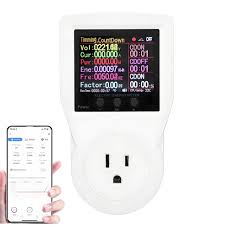
Smart plugs and electricity monitors help you see and control how much power your devices use. They can lead to lower energy bills and a more efficient home. Knowing your energy habits is the first step to saving money and being more eco-friendly.
What Are Smart Plugs and Electricity Monitors?
Imagine a small device that plugs into your wall outlet. Then, you plug your lamp or fan into that device. That’s basically a smart plug.
It’s like a little brain for your regular appliances. You can turn them on or off using your phone. You can even set schedules for them.
Electricity monitors are a bit different. Some are whole-house systems. They connect to your home’s electrical panel.
They show you all the power used in your house. Others are smaller devices. You plug them into an outlet.
Then you plug your appliance into them. These show you the power that one specific item uses.
Both tools aim to give you a clearer picture of your home’s energy use. This helps you spot waste. It helps you make smarter choices about your appliances.
My Own “Energy Wake-Up” Call
I remember a time when my electricity bill was surprisingly high. It was summer, and I thought, “Okay, I’ve got the AC running a lot, that’s normal.” But it was more than normal. I started looking around my house.
I noticed so many things plugged in that I rarely used. My old gaming console. A second TV in the guest room.
A printer that always seemed to be on standby.
I felt a little frustrated. I was paying for power that I wasn’t even using. It felt like money was just floating away.
I decided to get one of those plug-in electricity monitors. I started with the items I suspected were the biggest culprits. The results were eye-opening.
My printer used more power on standby than I ever imagined. And that old charger I kept plugged in “just in case”? It was quietly draining power 24/7.
It was my own little “energy wake-up call.”
Smart Plug Features to Look For
Remote Control: Turn devices on/off from anywhere using your phone.
Scheduling: Set devices to turn on or off at specific times. Great for lamps or holiday lights.
Energy Monitoring: Some smart plugs show you how much power the connected device is using. This is super helpful.
Voice Control: Works with smart assistants like Alexa or Google Assistant.
Routines: Can be set up to work with other smart devices. For example, turning off all lights when you say “goodnight.”
Understanding the Numbers: Watts, Amps, and Kilowatt-Hours
To really get smart about power, we need to talk about what the monitors show. You’ll see terms like Watts. Watts (W) tell you how much power a device uses right now.
A bright light bulb uses more watts than a small LED one.
Amps (A) are about the flow of electricity. Think of it like water flow in a pipe. More amps mean more electricity moving.
Voltage (V) is the “push” behind that flow. Power (Watts) is calculated by multiplying Voltage by Amps (W = V x A).
The most important number for your bill is the Kilowatt-hour (kWh). This is the unit your electric company uses to charge you. A kilowatt is 1000 watts.
An hour is, well, an hour. So, if a device uses 1000 watts for one hour, it uses 1 kWh.
If a device uses 100 watts for 10 hours, that’s also 1 kWh (100 watts x 10 hours = 1000 watt-hours, or 1 kWh).
Electricity monitors show you the real-time watts. They often calculate and show you the kWh used over time. This helps you connect what you see on the monitor to what you see on your bill.
How Smart Plugs Help You Save
Smart plugs are fantastic for stopping “vampire power.” This is the power devices use when they are off but still plugged in. Many electronics, like TVs, computers, and chargers, draw power even when not in use. This is often called standby power.
With a smart plug, you can schedule devices to turn off completely when you’re not using them. For example, you can set your home office printer to turn off at night. Or you can set your entertainment center to power down after midnight.
Many smart plugs also have their own energy monitoring. This is a double win. You can see exactly how much power a specific appliance is using.
Then, you can use the scheduling feature to cut that usage when it’s not needed.
Let’s say you have an old video game console. It might use 20 watts on standby. If you leave it plugged in 24/7, that’s 480 watt-hours a day.
That’s about 175 kWh a year. If your electricity costs 15 cents per kWh, that’s nearly $27 a year for a console that’s just sitting there!
Using a smart plug to turn it off when not in use saves that $27. It might not sound like a lot, but imagine doing this for several devices. It adds up quickly.
Simple Smart Plug Uses
- Lamps: Schedule lamps to turn on at dusk and off at bedtime.
- Holiday Lights: Easily control and schedule decorative lights.
- Fans: Set fans to turn off automatically if you forget.
- Coffee Makers: Some smart plugs can even turn on a coffee maker just before you wake up (ensure the maker is safe to auto-start).
- Phone Chargers: Stop overnight charging. Overcharging can be bad for battery life and wastes a tiny bit of power.
Electricity Monitors: Your Home’s Power Dashboard
Electricity monitors give you a bigger picture. A whole-house monitor connects to your electrical panel. It shows you the total power draw of your entire home at any moment.
It also tracks your usage over time.
This is incredibly useful for identifying energy hogs. You might see a sudden spike in usage at a certain time of day. You can then investigate what’s running.
Is it the air conditioner kicking in? Is it a specific appliance you forgot about?
Smaller, plug-in monitors are great for targeting individual devices. You can plug one into an outlet and then plug in your refrigerator. You can see its energy use over a day or a week.
You might be surprised to learn how much energy your fridge is actually using.
These monitors help you understand:
- Which appliances use the most power.
- When your home uses the most power.
- If an appliance is using more power than it should (which could mean it’s old or faulty).
Knowing this information allows you to make informed decisions. You can choose to replace older, less efficient appliances. You can adjust your habits.
You might decide to run your dishwasher only during off-peak hours if your utility offers them.
Plug-In Monitor Quick-Scan Table
| Device Example | Typical Watts (Active Use) | Typical Watts (Standby) | Potential Savings with Smart Plug |
| LED Lamp | 10W | 0W (if switched off) | None (if switched off) |
| Desktop Computer Monitor | 25W | 5W | Significant, by scheduling off-hours. |
| Old Phone Charger | N/A (doesn’t draw much when charging) | 2-3W | Small, but consistent daily savings. |
| Wi-Fi Router | 10W | 10W (always on) | Minimal, usually left on. |
Putting It All Together: Smart Plugs vs. Monitors
It’s not really an “either/or” situation. Smart plugs and electricity monitors work best together. A smart plug gives you control.
An electricity monitor gives you data. Both help you save energy and money.
You can use a smart plug with energy monitoring. This gives you control and data for one specific device. This is often the easiest starting point for many people.
If you have a whole-house monitor, you can then identify problem areas. You might see your entertainment center is always drawing power. Then, you can use a smart plug on that specific outlet to schedule it off.
Or you can just be more mindful of unplugging devices.
Think of it like this: the monitor shows you where the leaks are. The smart plug helps you stop the leaks or turn off the faucet. It’s a team effort for your home’s energy use.
Real-World Scenarios Where They Shine
Let’s look at some common situations. Imagine you have a “smart home” setup. You can create routines.
When you say “Goodnight,” your smart plugs can turn off all unnecessary lights and devices. Your TV, game consoles, and even your coffee maker can go into standby or fully off.
Consider vacation homes or rental properties. You can remotely check if devices have been left on. You can turn them off from miles away.
This prevents wasted energy and can even improve safety.
What about older homes? They might not have the latest energy-efficient appliances. Using smart plugs and monitors can help you manage the energy use of these older items.
You can identify which ones are costing you the most. Then you can decide if it’s worth upgrading them.
In apartments, space is often limited. Smart plugs are small and don’t take up much room. They offer a simple way to gain control over your energy use without major home changes.
When Is It Normal, and When Should You Worry?
Some devices use a lot of power by nature. A refrigerator runs 24/7 to keep food cold. An air conditioner uses a lot of power to cool your home.
A washing machine or dryer uses significant power during its cycle.
It’s normal for these devices to show high wattage numbers when they’re actively working. What you want to watch for are devices using a lot of power when they shouldn’t be.
When to worry:
- A device that’s supposed to be off is showing a high wattage on your monitor.
- Your overall home energy use suddenly jumps without a clear reason (like using the AC more).
- An appliance feels unusually hot to the touch when it’s not supposed to be working hard.
- You notice flickering lights that seem tied to a specific appliance.
These could be signs of an appliance that’s about to fail. Or it could indicate a problem with your home’s wiring. If you see these signs, it’s a good idea to consult a qualified electrician or appliance repair person.
For most people, smart plugs and monitors are about optimizing. They help you trim down energy waste, not uncover major dangers. But it’s always good to be aware of potential issues.
My Experience with a “Faulty” Appliance
Observation: I noticed my refrigerator’s energy usage on my monitor seemed higher than I expected, even during periods when it wasn’t actively cooling. It also seemed to run more often than I remembered.
Action: I checked the door seals to make sure they were tight. I also made sure there wasn’t too much stuff packed in front of the vents inside. The monitor still showed slightly higher usage.
Result: A few months later, the fridge started making strange noises. A repairman found a minor issue with the compressor fan. Fixing it brought the energy usage back down to normal levels.
The monitor helped me notice the problem before it became a major breakdown.
Quick Tips for Smart Energy Use
Here are some easy ways to use your smart plugs and monitors to save:
- Start Small: Pick one or two devices that you suspect use a lot of power. Use a plug-in monitor on them first.
- Schedule Wisely: Don’t just turn everything off. Think about when you actually need devices. A lamp on a timer for when you get home is useful. A printer that’s always plugged in might not be.
- Look for “Energy Star”: When buying new appliances, look for the Energy Star label. These products are designed to be more energy efficient.
- Unplug Chargers: Chargers use a small amount of power even when not charging a device. Unplug them or use a smart plug to turn off the outlet at night.
- Batch Tasks: If you have a lot of small electronics that need charging, try to do it all at once. Then you can turn off that area with a smart plug.
- Understand Your Bill: Many utility companies offer online tools to track your energy use. Compare this to your monitor’s readings.
Frequent Questions About Smart Plugs and Electricity Monitoring
Are smart plugs safe to use?
Yes, most smart plugs from reputable brands are safe. Always follow the manufacturer’s instructions. Make sure the plug is rated for the wattage of the appliance you’re connecting.
Avoid overloading them.
Do smart plugs actually save money?
They can, especially if you use them to cut down on standby power. By scheduling devices to turn off when not in use, you reduce wasted electricity. The amount saved depends on the devices and how you use the plugs.
What’s the difference between a smart plug and a timer outlet?
A timer outlet has set schedules built-in. A smart plug connects to Wi-Fi. This allows you to control it with your phone or voice.
You can often create more complex schedules with smart plugs and monitor energy use.
How do I know if my electricity monitor is accurate?
Most monitors are quite accurate for home use. For whole-house systems, professional installation usually ensures accuracy. For plug-in monitors, they measure the power directly.
Comparing readings for known devices can give you confidence.
Can I use a smart plug on a refrigerator or freezer?
It’s generally not recommended to use a smart plug on refrigerators or freezers. These appliances need continuous power. Turning them off unexpectedly can cause food spoilage.
They also use power in a more complex way than simple electronics.
What if my Wi-Fi goes out? Do smart plugs still work?
Some smart plugs can operate on their last set schedule even without Wi-Fi. However, you won’t be able to control them remotely or change settings until your Wi-Fi is back online.
Are there different types of electricity monitors?
Yes. You have plug-in monitors for individual devices. Then there are whole-house monitors that connect to your electrical panel.
Some also come as clamp meters that electricians use.
Final Thoughts on Energy Awareness
Understanding your home’s electricity use doesn’t have to be complicated. Smart plugs and electricity monitors are wonderful tools. They put power back into your hands.
They help you see where your money is going. With a little awareness, you can make your home more efficient. You can save money and help the planet, one plug at a time.




Leave a Reply